How to Add Equations to a Research Poster: LaTeX, Inline and Display
Type LaTeX, see a live preview and place equations inline or on their own line. How to write maths that reads from two metres, fix LaTeX errors and export equations to PowerPoint.
By PosterScientist · Published · 6 min read

Quick answer
How do I add an equation to a research poster?
In PosterScientist, open the box in focus view, place the cursor, click Equation and type LaTeX such as Q_{10} = (R_2/R_1)^{10/(T_2-T_1)}. A live preview checks it as you type. Choose Inline to keep it in the sentence or Display to centre it on its own line. Keep poster equations few and short, and define every symbol next to them.
Equations on a poster work differently from equations in a paper. Nobody derives anything standing in a corridor: visitors glance at the one relation your work depends on, then read the result. So a poster needs few equations, set large, with every symbol explained. This guide shows how to add them in PosterScientist with LaTeX, when to use inline or display equations, and what happens when you export.
When an equation belongs on a poster
Include an equation when:
- Your result depends on a model that experts will want to see, such as a rate law, a fitted function or a loss function.
- You report a derived quantity, such as Q₁₀, an activation energy or an effect size, and need to show how it is defined.
- The equation is the contribution itself.
Leave derivations, intermediate steps and standard textbook formulas to the paper. One or two display equations per poster is plenty.
Add an equation in PosterScientist
- Open the box in focus view. Double-click it on the poster, or select it and choose Focus on this box.
- Place the cursor where the equation should go.
- Click Equation in the toolbar.
- Type LaTeX. Snippet buttons insert common pieces: x², xᵢ, a/b, √x, Σ, ∫, ±, α, x̄ and ≤.
- Choose Inline or Display and press Enter (Shift+Enter adds a line to the LaTeX).
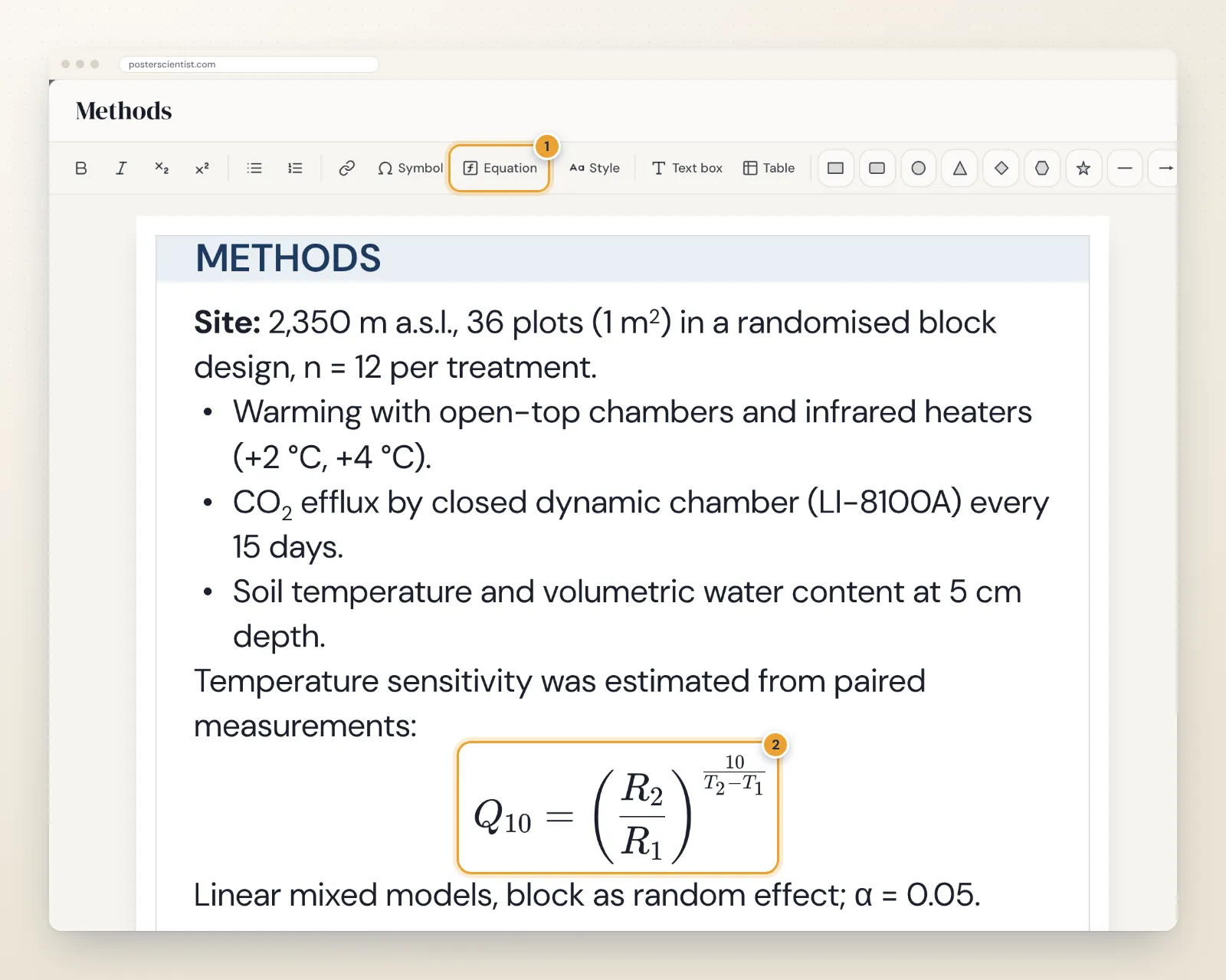
The preview under the LaTeX field updates as you type, so you see the result before inserting it.
Inline or display?
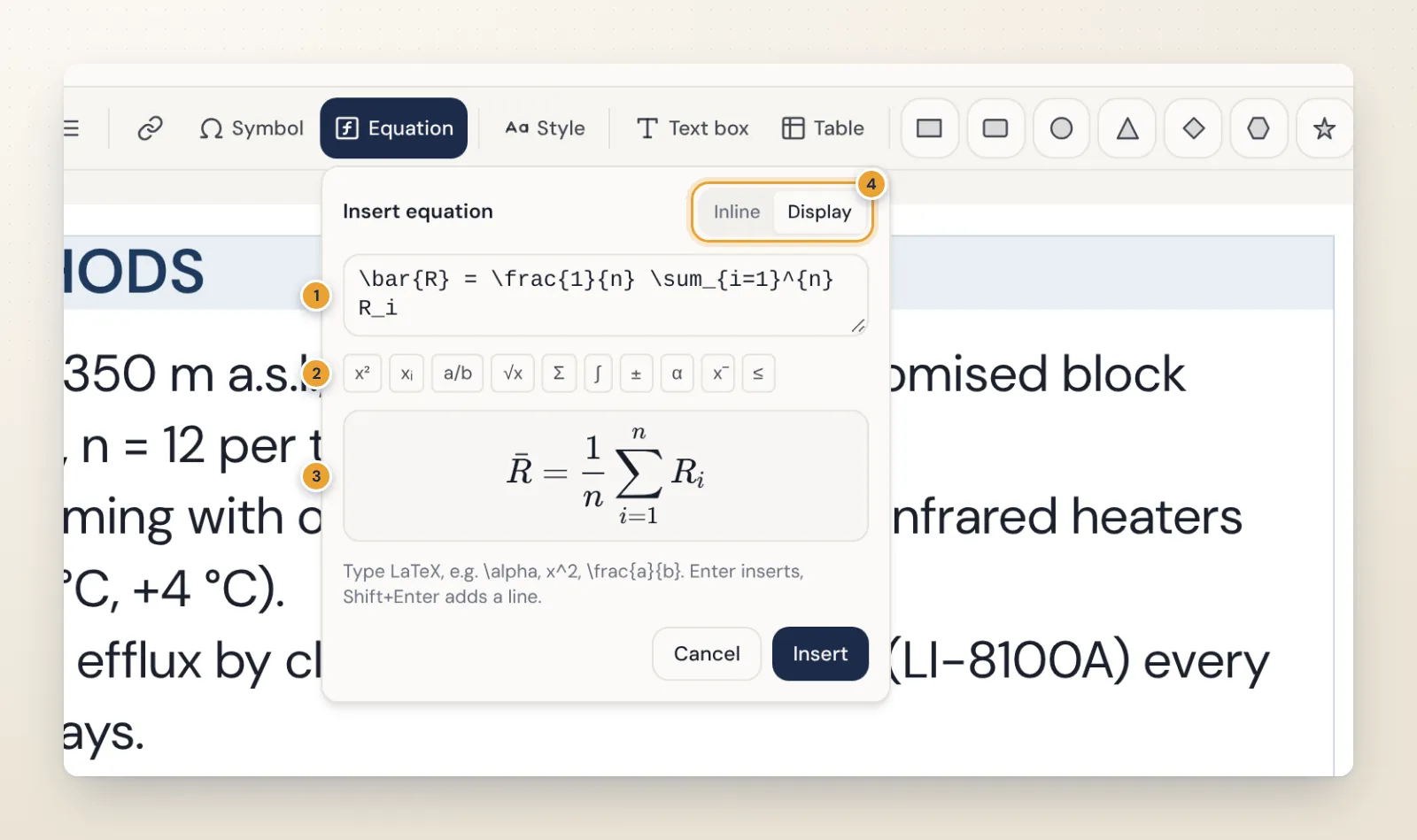
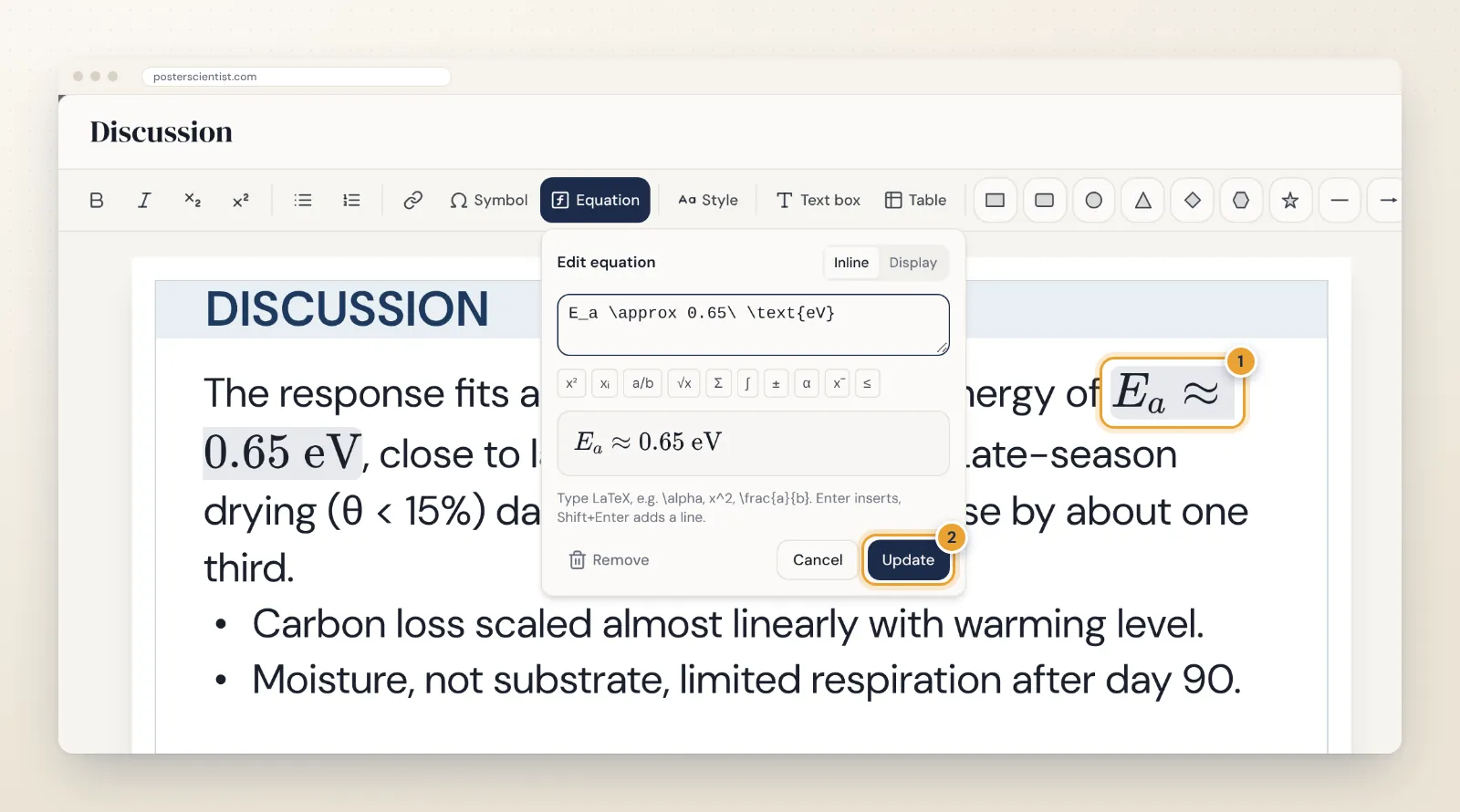
Inline equations sit in the line of text, like E_a ≈ 0.65 eV in a sentence. Use them for symbols and short expressions. Display equations are centred on their own line with space around them. Use them for the key relation, where a visitor should be able to read it from a distance.
To change an equation later, click it in the text. The same editor opens with Update and Remove buttons, and you can switch between Inline and Display there too.
LaTeX that reads well from two metres
- Keep it short. If it needs two lines, it probably belongs in the paper.
- Prefer slashes in inline maths. a/b reads better in a sentence than a stacked \frac{a}{b}, which shrinks the numbers.
- Use \left( and \right) around fractions in display equations so the brackets grow with them.
- Write words with \text{}, for example \text{eV} or \text{if } x > 0, so they are not set in maths italics.
- Use \times 10^{-3} for powers of ten, not the E notation from software output.
- Define symbols right underneath, in a short "where R is the respiration rate…" line.
| You want | Type |
|---|---|
| Subscript, superscript | x_{i}, x^{2} |
| Fraction | \frac{a}{b} or a/b |
| Square root | \sqrt{x} |
| Sum with limits | \sum_{i=1}^{n} x_i |
| Greek letters | \alpha, \beta, \Delta |
| Approximately, at most | \approx, \leq |
| Mean | \bar{x} |
| Words inside maths | \text{eV} |
Equations take the colour and size of the surrounding text, so they follow the box's text settings and stay consistent with the body. For single characters such as m² or CO₂, plain formatting is often simpler; the guide to scientific symbols, subscripts and superscripts explains when.
When the LaTeX will not render
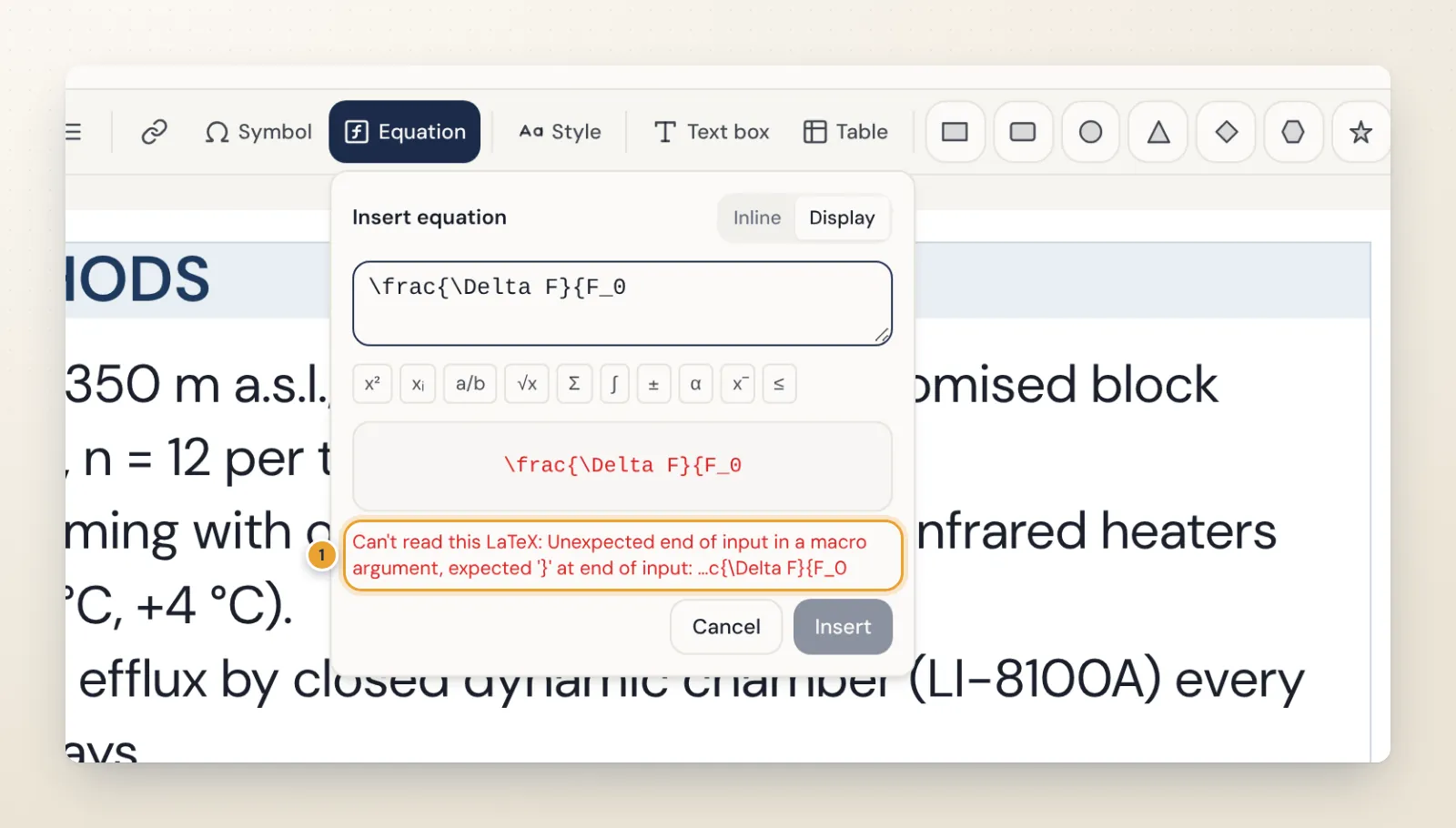
If the LaTeX cannot be read, the preview shows the raw text in red, the parser's message appears underneath and Insert stays disabled until it is fixed. The usual causes are a missing closing brace, a command without its backslash, or a misspelt command name. Commands that would add links or styles, such as \href, are not allowed.
How equations export
- PowerPoint: each equation becomes a picture rendered at 300 dpi for the size it is printed, and the boxes around it are laid out with the poster's fonts so line breaks match. The pictures print sharply but are not editable equations in PowerPoint; the text around them stays editable.
- SVG: equations are embedded as the same high-resolution pictures.
- PDF (Pro): drawn from the SVG export, so equations appear exactly as in the editor.
Keep your LaTeX: to change an equation, edit it in PosterScientist and export again. If a co-author needs an editable equation in PowerPoint, recent versions of PowerPoint for Microsoft 365 can type equations in LaTeX format with Insert > Equation.
Common equation mistakes on posters
- Equations as screenshots. A picture of an equation copied from a PDF is usually blurry at poster size and in the wrong font and colour. Type the LaTeX instead.
- Symbols that are never defined. A visitor who does not work in your subfield cannot guess what k or θ means. Add a one-line definition under each display equation.
- A derivation instead of a result. Show the relation you used, not the steps that lead to it.
- Inconsistent notation. If the text says Q₁₀ and the equation says Q10, readers wonder whether they are the same thing. Use the same symbols in text, equations, figure labels and tables.
- Equations that are too small. Display equations are often shrunk to fit a narrow column. Give them the full width of the box instead.
Quick checklist
- One or two display equations, set at least at body size
- Every symbol defined next to the equation
- Units with \text{}, powers of ten with \times 10^{n}
- Checked once more in the exported file at 100 percent zoom
Try it
Open the free research poster maker and start from a template with room for methods, such as the free Physics Minimal template, which leaves space for display equations, the scientific poster templates or the engineering poster templates. For the rest of the text, the typography guide covers fonts and sizes, and results tables shows how to present the numbers your equations produce. The step-by-step guide to making a research poster puts it all together.
Frequently asked questions
Can I use LaTeX on a poster without writing the whole poster in LaTeX?
Yes. In PosterScientist each equation is written in LaTeX and rendered with KaTeX, while the rest of the poster stays a normal visual layout. Fractions, roots, sums, integrals, Greek letters, accents, brackets and \text{} for words inside equations all work.
Are equations editable after exporting to PowerPoint?
Not as equations. They are placed in PowerPoint as high-resolution pictures, rendered at 300 dpi for the size they are printed, so they print sharply but cannot be edited there. To change one, edit it in PosterScientist and export again, or retype it with PowerPoint's own equation tool.
How big should equations be on a poster?
At least as large as the body text, which is 24 to 32 pt on an A0 or 48 × 36 in poster. Equations take the size and colour of the text around them, so they follow the box's text size automatically.
Why does my equation show an error?
The LaTeX could not be read, usually because of a missing brace, a missing backslash or a misspelt command. The editor shows the parser's message under the preview and keeps Insert disabled until the LaTeX is valid. Commands that add links or styles, such as \href, are not allowed.
Should I use inline or display equations?
Inline for short symbols and expressions inside a sentence, such as E_a or p < 0.05. Display, centred on its own line, for the one or two relations a visitor should see from a distance.