Scientific Symbols, Subscripts and Superscripts on Research Posters
H₂O, m², µm, ±, °C and author affiliation numbers: how to type scientific notation correctly on a poster so it survives export to PowerPoint, SVG and PDF.
By PosterScientist · Published · 5 min read

Quick answer
How do I add subscripts, superscripts and symbols to a poster?
Use real subscripts and superscripts (H₂O, m², 10⁻³) instead of lookalikes such as H2O or m^2, insert Greek letters and units such as µ, ±, ° and Å from a symbol picker, and mark author affiliations with superscript numbers. In PosterScientist, Ctrl+, and Ctrl+. switch subscript and superscript on, and typing ^1 after a name in the author line makes it a superscript.
Small notation errors make a careful poster look rushed: "CO2" instead of CO₂, "m^2" for m², "+/-" for ±, "u" for µ. They are easy to avoid once you know where the right characters live, and they matter more on a poster than in a paper because readers see them large. This guide covers subscripts and superscripts, the symbols you need most, and author affiliation numbers.
The notation that matters most
| Write | Not | Notes |
|---|---|---|
| H₂O, CO₂ | H2O, CO2 | Chemical formulas use subscripts |
| m², s⁻¹ | m2, m^2, s-1 | Units with exponents use superscripts |
| 3.2 × 10⁻³ | 3.2E-3, 3.2x10⁻³ | Use the multiplication sign and a superscript |
| 4.1 ± 0.3 | 4.1 +/- 0.3 | One character, with spaces around it |
| 25 °C | 25 deg C, 25 oC | Degree sign, space before °C |
| 50 µm | 50 um | Micro sign or Greek mu |
| −0.4 | -0.4 | A true minus sign is longer than a hyphen |
| 10–20 days | 10-20 days | En dash for ranges |
| ¹³C, ²H | 13C, 2H | Isotopes take a leading superscript |
Journals and fields differ on details such as a space before %, so follow your target journal's style and stay consistent across the poster.
Subscripts and superscripts in text boxes
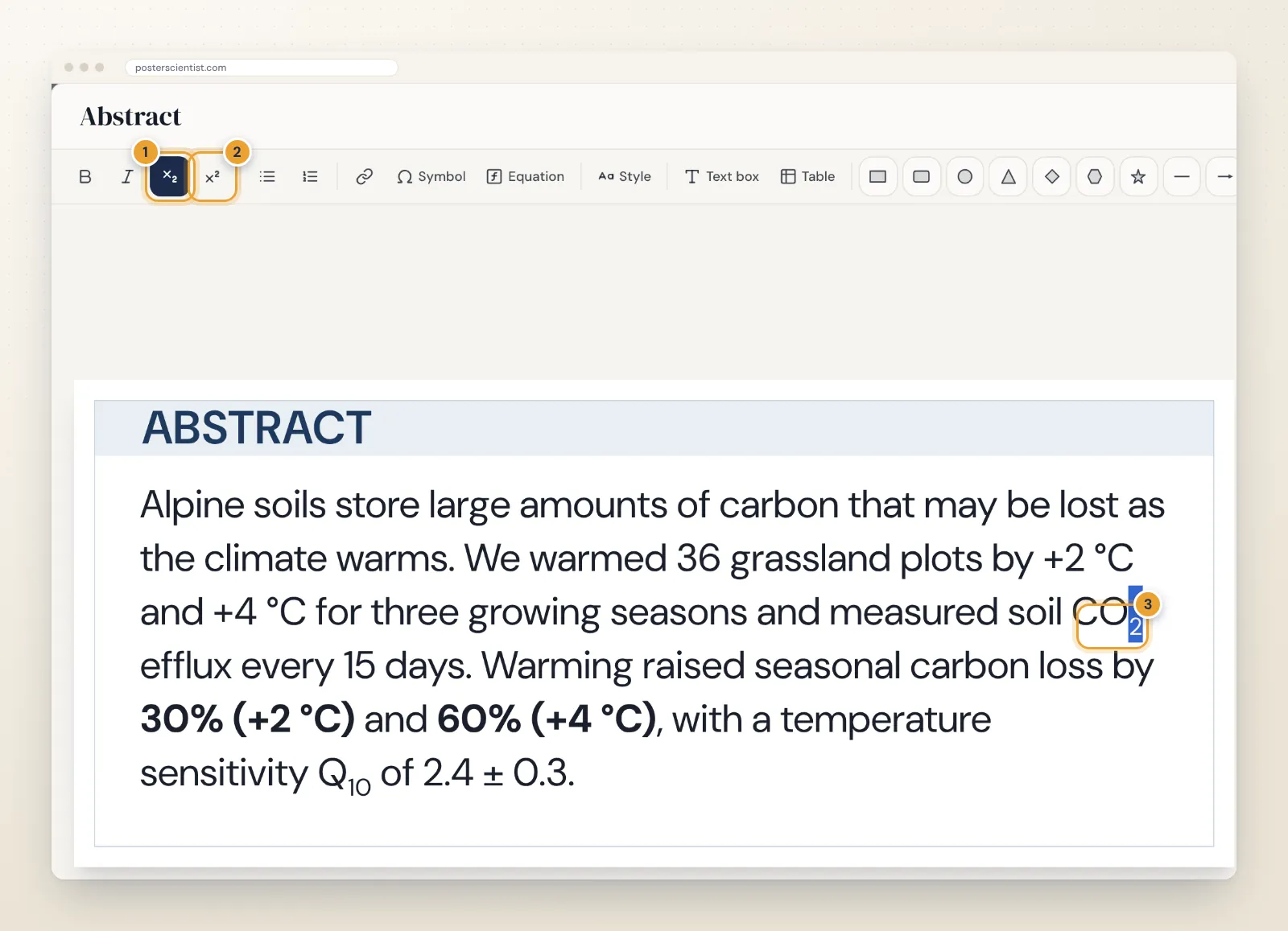
Open a box in focus view and select the characters to change. The x₂ button (or Ctrl+,) makes them subscript and the x² button (or Ctrl+.) superscript. With nothing selected, the same buttons switch the mode on for what you type next. The formatting shows on the poster as you type.
Insert symbols and Greek letters
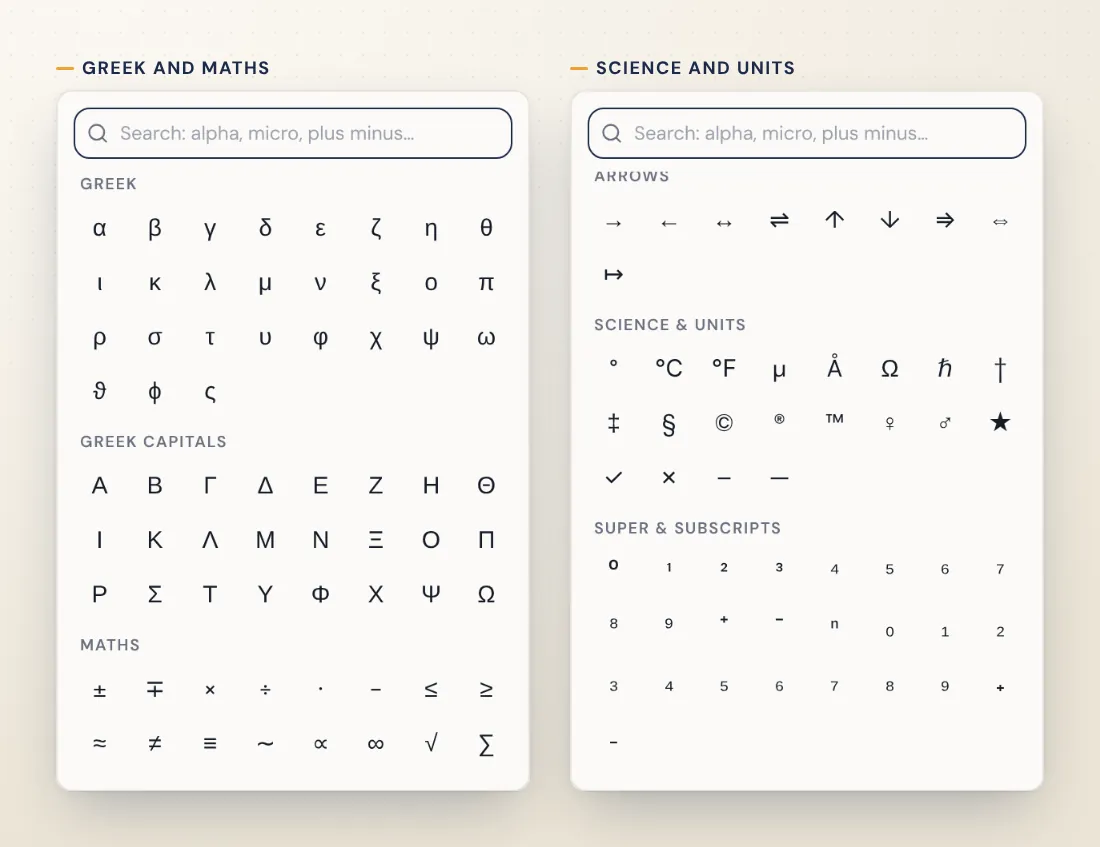
Click Symbol in the toolbar for a picker grouped into Greek, Greek capitals, Maths, Arrows, Science & units, and Super & subscripts. Type in the search box to filter by name: "plus minus", "micro", "angstrom", "degree" or "equilibrium" all find what you expect. Click a symbol to insert it at the cursor.
| Symbol | Group in the picker | Search for |
|---|---|---|
| µ (micro sign) | Science & units | micro |
| ± | Maths | plus minus |
| °, ℃ | Science & units | degree, celsius |
| × | Maths | multiply |
| ≈, ≤, ≥ | Maths | approx, leq, geq |
| Å | Science & units | angstrom |
| ⇌, → | Arrows | equilibrium, reaction |
| Δ, Σ | Greek capitals | delta, sigma |
| ², ₂ | Super & subscripts | sup, sub |
The Super & subscripts group holds Unicode digits such as ² and ₂. They are ordinary characters, so they work anywhere, including table cells and plain-text fields, but only digits and a few signs exist. Use the toolbar formatting for everything else.
Author lists and affiliation numbers
Author lines are where superscripts appear most, and where they go wrong most often. In the Header section, type the authors as plain text and put a caret before each affiliation number:
- Jane Smith^1 becomes Jane Smith¹
- John Doe^2,3 sets 2,3 in superscript, and ^1-4 gives a range
- ^a and ^* work for letters and symbols, and ^{…} takes anything else
In the Affiliations field, start each line with its number in the same way, one affiliation per line. Ctrl+B makes the presenting author bold, and Shift+Enter breaks a long title onto a second line.
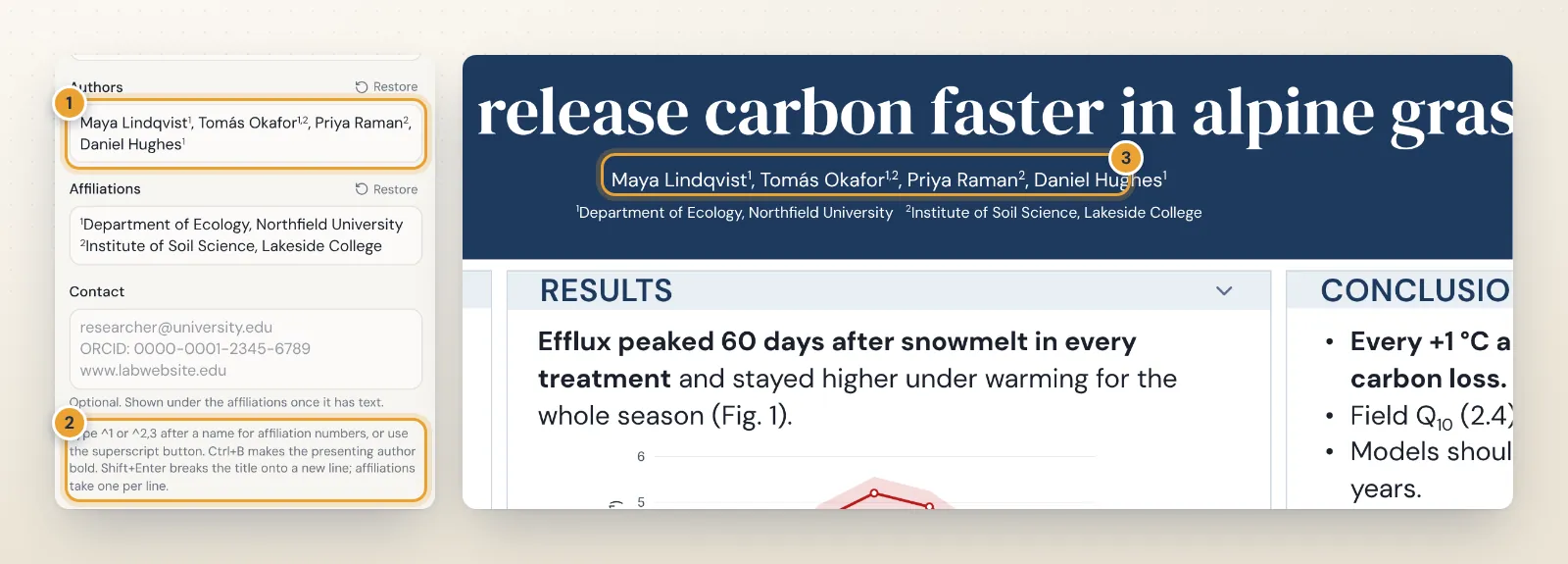
A few conventions keep author lines clean: number affiliations in order of first appearance, put the superscript directly after the name and before the comma, keep each affiliation short (department, institution, city or country) and mark the corresponding author with an asterisk explained in the contact line.
Charges, isotopes and pasted text
Ions combine both: the count is a subscript and the charge a superscript, as in SO₄²⁻ or Ca²⁺. Isotope mass numbers go before the symbol as a leading superscript (¹³C, ¹⁵N), and oxidation states in Roman numerals stay on the line, as in Fe(III).
Be careful with text copied from PDFs, older Word files or reference managers. Subscripts often arrive as ordinary digits, ligatures such as "fi" can turn into odd characters, and minus signs become hyphens. Read every pasted formula once after pasting, and fix it with the toolbar or the symbol picker before you move on.
Italics and units
- Variables in italic, units upright: in t = 30 s, the t is italic and the s is not. Gene names follow their field's italic conventions.
- A space between number and unit (5 cm, 25 °C), except for plane angles (45°).
- Do not pluralise units (5 kg, not 5 kgs) and do not add full stops after them.
When to use an equation instead
Formatting handles single subscripts and superscripts well. For fractions, roots, sums, stacked indices or anything more complex, insert a LaTeX equation instead; the guide to equations on research posters shows how.
Check the exported file
Subscripts and superscripts export to PowerPoint as real text formatting, so they stay editable, and as styled text in SVG. If a symbol appears as an empty box in another program, that font lacks the character; switching to a font with wider coverage fixes it. The print-ready PDF export (Pro) embeds fonts and draws missing characters with a fallback font. Always scan the final PDF once at 200 percent zoom for stray "2"s that should be subscripts.
Keep going
The typography guide for academic posters covers fonts and sizes, and results tables is where symbols such as ± turn up most. Field templates such as the biology poster templates, the pharmacy poster templates and the free Chemistry Lab template are a good place to try them, all inside the free research poster maker.
Frequently asked questions
How do I type a subscript, such as the 2 in H₂O?
Select the character and press Ctrl+, or click the x₂ button in the text toolbar; Ctrl+. or x² makes a superscript. You can also switch the mode on, type the character and switch it off again. For plain-text places such as table cells, use the Unicode subscript and superscript digits from the symbol picker.
How do I add affiliation numbers to the author list?
In the Header section, type a caret and the number straight after each name: Jane Smith^1, John Doe^2,3. The editor turns ^1, ^2,3, ^1-4, ^a and ^* into superscripts, and ^{…} works for anything else. The superscript button does the same for selected text.
Is µ (micro sign) the same as μ (Greek mu)?
They look the same in most fonts but are different characters. The symbol picker has both: the micro sign under Science & units (search micro) and the Greek letter under Greek (search mu). Either reads correctly as a unit prefix; just use one consistently.
Will subscripts and superscripts survive the PowerPoint export?
Yes. They export as real subscript and superscript text formatting in PowerPoint, so they stay editable, and as styled text in SVG. The Pro PDF export embeds the fonts and draws any characters a font lacks with a fallback font.
When should I use an equation instead of superscripts?
When there is more than a single sub- or superscript: fractions, roots, sums, stacked indices or anything you would write in LaTeX. Short units and formulas like m² or CO₂ are fine as formatted text.